


Smart locks have become one of the hottest smart home upgrades in 2025, allowing you to secure your door with convenience and peace of mind. 2025 is shaping up to be the year of the smart lock, as modern connected locks now rival traditional deadbolts in security while adding tons of smart features. In this comprehensive Amazon smart lock review roundup, we’ll compare the best smart locks of 2025 – from cheap keyless entry gadgets under $100 to premium Alexa-enabled deadbolts – to help you find the right fit. We’ve targeted US-based needs, including cheap smart door locks, smart locks for renters, and high-end models, with a focus on bestselling picks on Amazon (as of Q2 2025). Read on for detailed comparisons of features like compatibility (Alexa/Google/Apple), connectivity (Wi-Fi, Bluetooth, Z-Wave), security ratings, installation ease, and overall user-friendliness.
Quick Comparison of Top Smart Locks in 2025
To kick things off, here’s a quick comparison of some top-rated smart locks of 2025 across various price tiers. This table highlights key features at a glance:
| Smart Lock Model (Category) | Price Range | Connectivity | Compatibility | Notable Features |
|---|---|---|---|---|
| Wyze Lock Bolt (Budget) | ≈ $70 – $80 | Bluetooth (No Wi‑Fi) | None (no voice assistant support) | Keypad + fingerprint reader; 1-year battery life; auto-lock (no remote access) |
| Yale Assure Lock 2 (Mid-range) | ≈ $160 base | Bluetooth (Wi‑Fi or Z-Wave module add-on) | Alexa, Google, Apple Home, SmartThings (with module) | Keypad (or touchscreen); optional Wi-Fi module for remote access; ANSI Grade 2 security; slim design; auto-unlock feature. |
| August Wi-Fi Smart Lock (Mid-range retrofit) | ≈ $180 – $230 | Wi‑Fi + Bluetooth | Alexa, Google Assistant, Apple HomeKit | ~3-month battery life (CR123 batteries). |
| Schlage Encode (High-end) | ≈ $200 – $250 | Wi‑Fi (built-in) | Alexa, Google, Apple HomeKit<sup>†</sup> (Plus model) | Fully keyless deadbolt with touchscreen; ANSI Grade 1 highest security; 100+ user codes for guests; easy install (10 minutes). |
| Level Lock Touch Edition (Premium) | ≈ $300 – $329 | Bluetooth, NFC (Home Key on Level+ model) | Apple HomeKit (native), Alexa (via app)<sup>‡</sup> | Invisible in-door design (fits inside the door); touch-to-lock/unlock and keycard access; elegant look, high-quality build (great for upscale homes). |
Best Budget Smart Door Locks (Under $100)
You don’t need to spend a fortune to enjoy keyless entry. Several cheap smart door locks under $100 offer solid basic functionality like PIN codes or fingerprint access. Budget smart locks typically forego Wi-Fi connectivity and advanced integrations, focusing on core features and ease of use. They’re great for apartments, rentals, or anyone looking for a cheap smart door lock that gets the job done without breaking the bank.
Wyze Lock Bolt — Affordable Fingerprint Access on a Budget

The Wyze Lock Bolt is one of the best budget smart locks you can buy, usually priced around $70-80. Despite the low cost, it packs a fast fingerprint reader and backlit keypad for PIN codes. This Bluetooth-only deadbolt doesn’t require any hub – you simply unlock via the fingerprint sensor, the keypad, or the Wyze mobile app when within Bluetooth range. Wyze deliberately left out Wi-Fi to keep costs down and maximize battery life – you can expect over 1 year on a set of four AA batteries since it’s not constantly online. The lock will auto-lock behind you (configurable) for security, so you never have to worry if you forgot to lock the door.
While the Lock Bolt lacks remote connectivity out of the box (no Alexa/Google voice control or app access when you’re away), Wyze offers a workaround: if paired with the Wyze Video Doorbell Pro as a Wi-Fi bridge, you can unlock it remotely in a pinch. However, this is a bit clunky and still doesn’t allow remote locking. Essentially, the Wyze Lock Bolt is best for users who don’t need smart home integration and just want an electronic lock with fingerprint and code entry for a super affordable price. It’s not the sleekest-looking gadget (the interior housing is a big hunk of plastic), but it’s functional and extremely popular as a value pick. At under half the price of most Wi-Fi locks, it’s a cheap smart lock that covers the basics very well.
TEEHO Keypad Deadbolt — Ultra-Cheap Keyless Entry (No Frills)
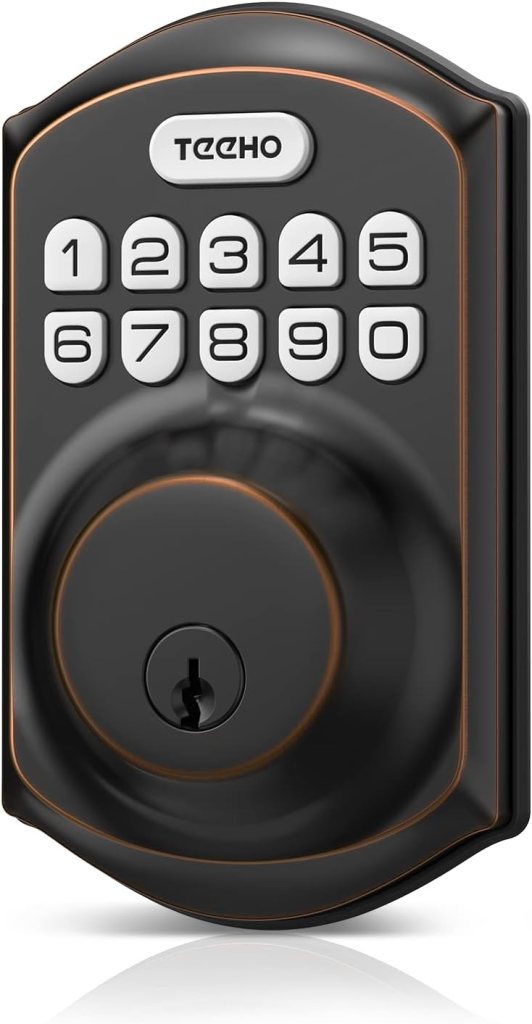
If you’re simply looking to ditch keys for as little cash as possible, the TEEHO TE001 Keyless Entry Lock is a standout Amazon bestseller in the budget category. Often priced around $40-50, this device is essentially a basic electronic keypad deadbolt with a physical key backup. It doesn’t connect to any app or voice assistant – so technically it’s more of a “digital lock” than a full smart lock – but its rock-bottom price has made it the #1 best seller in Amazon’s Deadbolts category. Thousands of buyers have given it an average 4.5-star rating, proving there’s huge demand for cheap, no-frills keyless locks.
The TEEHO lock is easy to install with just a screwdriver and fits standard doors. You program PIN codes directly on the keypad, and it also comes with two traditional keys as backups. It even supports features like auto-locking after a delay to boost security. What it lacks are any smart integrations – no smartphone alerts, no remote unlock, no Alexa. For many people (especially renters on a budget or those who can’t install a high-tech system), that’s fine. This kind of cheap smart door lock provides keyless convenience and a bit of modern flair without any network setup. Just be aware that since it’s not connected, you won’t get notifications or be able to change codes unless you’re physically at the door. Overall, the TEEHO and similar budget keypad locks (including some models from Amazon Basics) offer an ultra-affordable entry into keyless entry, even if they aren’t “smart” in the IoT sense.
(Other budget-friendly smart lock brands on Amazon include Sifely, Veise, and Hornbill, which offer similar keypad deadbolts under $100. These can be good alternatives, but be sure to read reviews for long-term reliability.)
Best Mid-Range Smart Locks ($100 – $200)
The mid-range is the sweet spot for smart locks in 2025. In the $100–$200 price bracket, you’ll find feature-rich locks from top brands that balance cost and capabilities. These locks typically include Wi-Fi or Z-Wave connectivity for full remote access, voice assistant compatibility (Amazon Alexa, Google Assistant, etc.), and robust apps – all while remaining reasonably priced. If you’re a homeowner looking for the best value smart lock, this category is your go-to. We highlight both retrofit smart locks (which keep your existing deadbolt hardware) and full replacement locks in this range.
August Wi-Fi Smart Lock (4th Gen) — Top Retrofit Lock for Most People
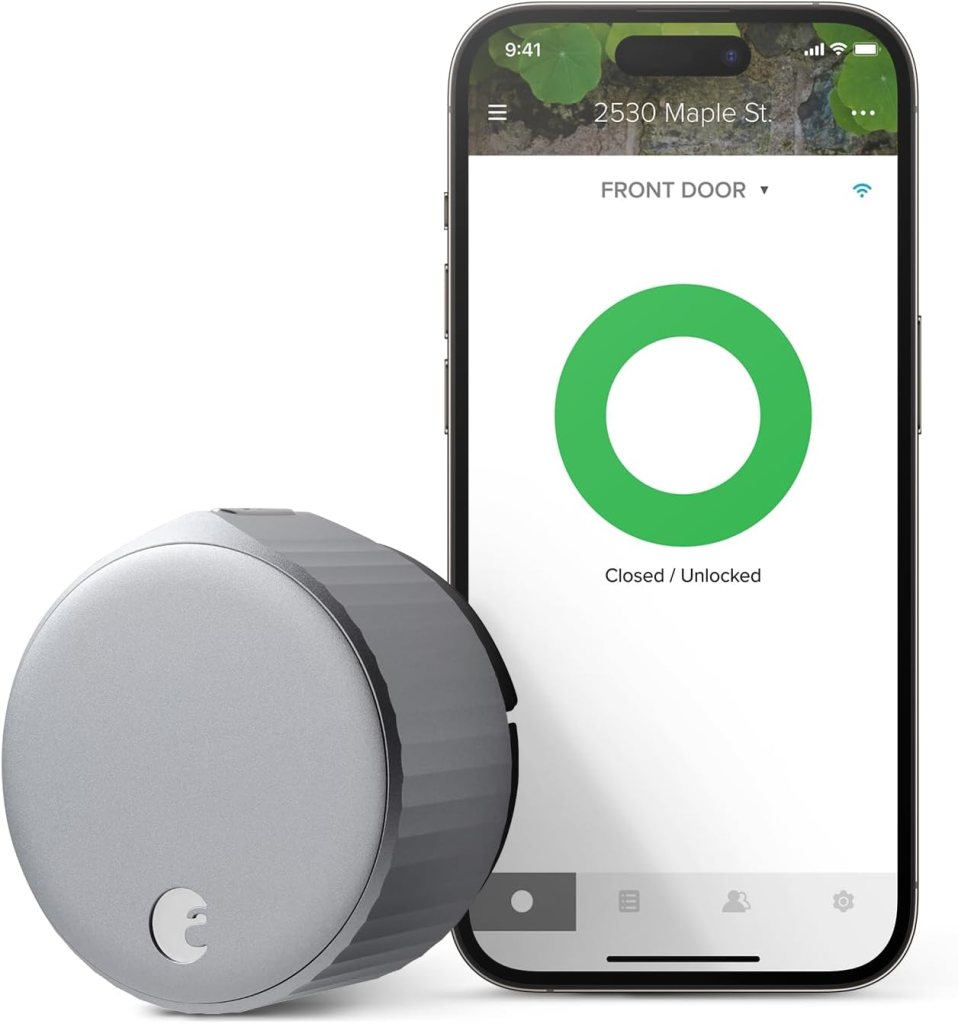
The August Wi-Fi Smart Lock is often cited as the best smart lock for most people, and for good reason. This sleek little device attaches to your door’s existing deadbolt on the inside, so you can keep your original exterior key and hardware – a huge plus for renters or anyone not wanting to change the look of their door. Installation is incredibly simple (about 10 minutes with just a screwdriver) and it’s completely invisible from the outside. August’s lock has built-in Wi-Fi and Bluetooth, enabling remote access and control from anywhere via the excellent August app. It also integrates with almost every smart home system – Amazon Alexa, Google Assistant, and Apple HomeKit – giving you voice control and automation with whichever platform you prefer.
Once connected, the August lock allows you to lock/unlock from your phone, share digital “keys” with guests, and even set up auto-unlock via geofencing (so it can automatically unlock when you come home). That auto-unlock feature is a game-changer for hands-full arrivals, although like all such features it isn’t 100% perfect and might occasionally make you pull out your phone. August also supports DoorSense, a sensor that can tell if the door is open or closed. For those worried about security, August locks are rated high quality and have proven very secure over years of use. In fact, this model is so popular that it boasts thousands of positive reviews on Amazon (averaging ~4.4 stars).
One important caveat with August: battery life. To keep its compact size, the August Wi-Fi Smart Lock uses two CR123 lithium batteries, which tend to last only about 2–3 months before needing replacement. This is notably shorter than many competitors that use 4 AAs (often 6–12 months life). Keep some spare CR123s on hand (and note, they’re a bit pricey). Also, out of the box August has no keypad or fingerprint – it’s meant to be used with phone or your original key. If you want PIN code entry, August sells a separate wireless keypad accessory. The good news is August’s parent company Yale released a new keypad with fingerprint reader that pairs with August locks, adding more entry options (though at extra cost). Despite these minor downsides, August’s ease of installation, broad compatibility, and user-friendly app make it one of 2025’s best smart locks for most households. (It was Tom’s Guide’s #1 pick for overall best smart lock as of May 2025.)
Yale Assure Lock 2 — Flexible Smart Deadbolt with Modular Upgrades

Yale has been a trusted name in locks for over a century, and their latest Yale Assure Lock 2 line shows why. The Assure Lock 2 is a full deadbolt replacement that comes in many variants, all sharing a slim, modern design and solid construction. Even the base model (around $150–$160) offers Bluetooth connectivity and a backlit touch keypad for PIN codes. What really sets it apart is Yale’s swappable module system – you can upgrade the lock with a plug-in module for Wi-Fi or Z-Wave as needed. This means you can start with a cheaper Bluetooth-only lock and later add Wi-Fi for Alexa/Google integration or Z-Wave to tie into a SmartThings or Ring Alarm hub. It’s a future-proof design, and Yale has even promised a module for the new Matter standard down the line.
In everyday use, the Yale Assure 2 is a pleasure. The keypad is responsive and, if you opt for the fingerprint reader version (~$210), unlocking is as simple as a touch. (Yale offers versions with or without a keyhole, and with either a touchscreen or physical button keypad – choose based on your preference.) The lock supports auto-unlock via Bluetooth as you approach, which can save you from fumbling for codes or keys. With the Wi-Fi module added, it works seamlessly with Alexa and Google Assistant for voice control and remote monitoring (Apple HomeKit support is available natively via Bluetooth for iPhone users, or via a forthcoming Matter module). The Assure 2 is also compatible with Apple Home Key on certain models – Yale sells an Assure 2 Plus that lets you store a digital key in your Apple Wallet for tap-to-unlock convenience, similar to the high-end Schlage Encode Plus.
Security-wise, the Yale Assure Lock 2 carries an ANSI/BHMA Grade 2 rating, which is very good for residential locks (Grade 1 is highest, typically found on a few pro-grade locks like Schlage). The lock’s slim profile and attractive finishes (black, bronze, brass, etc.) make it blend nicely with your door hardware. One of the best things about Yale’s smart locks is their flexibility – there’s a model for every need. Want a keyed deadbolt that also has a keypad? They have it. Prefer a completely keyless design for maximum security (no cylinder to pick)? They offer that too. All share the same Yale Access app, which is user-friendly for managing PIN codes (including scheduled codes for guests or Airbnb use). Overall, Yale Assure 2 provides a great balance of price, features, and expandability. It’s an ideal mid-range choice, especially if you want the option to add functionality over time.
Schlage Encode Smart Wi-Fi Deadbolt — Reliable, Secure & Alexa-Friendly
Schlage’s Encode Smart Wi-Fi Deadbolt is a top-selling stalwart in the smart lock world, popular for its reliability and robust security. It’s a full replacement deadbolt that comes with built-in Wi-Fi – so no external bridge or hub is needed. Just connect it to your home network and you can lock/unlock remotely via the Schlage Home app and integrate with voice assistants. In fact, the Encode is one of the best locks if you’re an Amazon Alexa user or have a Ring doorbell/security system. With Alexa, you can simply say “Alexa, lock the front door,” or check status via voice. It also works with Google Assistant and, in its latest iteration, with Apple HomeKit (the newer Schlage Encode Plus model introduced HomeKit and Apple Home Key support, making it one of the first locks to support Apple’s digital keys).
One big selling point of Schlage Encode is its strong security credentials. It carries an ANSI Grade 1 security rating – the highest for residential locks, meaning it’s extremely durable against forced entry. TechGearLab notes that to earn Grade 1, the lock survived six kick-in attempts and is even rated for some commercial use. In other words, Schlage didn’t compromise the physical lock quality when adding smart features. Users also love the touchscreen keypad on the Encode, which has big, easy-to-press digits and an option for one-touch locking on the keypad. You can program up to 100 unique PIN codes for family, friends, or Airbnb guests, and set schedules or temporary codes for each. The app logs every entry, so you can see who unlocked the door and when – great for peace of mind or managing guest access.
From an installation standpoint, the Encode is straightforward. It fits standard deadbolt holes and Schlage includes everything you need; users report it takes about 10 minutes with a screwdriver to install. Four AA batteries power the lock for about 6 months of typical use (and it will alert you when batteries run low). One thing to note: the interior unit of the Schlage Encode is on the larger side – a bit bulky – which some find less attractive inside the door. But that’s a minor trade-off for its feature set. If you want remote connectivity without any hubs, top-tier security, and tight integration with Amazon’s ecosystem, the Schlage Encode is hard to beat. It consistently ranks among the bestselling smart locks on Amazon, with over 15,000 ratings (average ~4.3★) to date. The newer Encode Plus variant (around $300) adds the Apple Home Key ability (so you can tap your iPhone or Apple Watch to unlock) at a higher price – a worthwhile upgrade for Apple enthusiasts, but the standard Encode (often ~$200) remains a terrific mid-range choice for most.
Other Notable Mid-Range Options (Ultraloq, Eufy, Kwikset, etc.)
- Ultraloq U-Bolt Pro (WiFi or Bluetooth) – A feature-packed 5-in-1 smart lock that often sells for ~$150–$180. It offers fingerprint unlocking, a numeric keypad, smartphone app, auto-unlock, and a physical key – covering every possible entry method. The WiFi version works with Alexa and Google Assistant (no hub needed), while a cheaper Bluetooth version can use a plug-in WiFi bridge. The Ultraloq’s rugged design and 360° fingerprint sensor have earned it a devoted following (it’s frequently recommended in smart home forums as a must-buy). If you want maximum versatility in a mid-range lock, the U-Bolt Pro is a leading contender.
- Eufy Smart Lock Touch & Wi-Fi – An excellent mid-tier lock from Anker’s Eufy brand, priced around $150. It features a sleek fingerprint reader on the handle, a backlit keypad, and built-in Wi-Fi. Eufy’s lock is known for its easy installation and responsive fingerprint unlocking, plus a solid app that doesn’t require subscription fees. It works with Alexa and Google (no HomeKit on the Wi-Fi model). A bonus: Eufy uses a rechargeable battery (via USB) instead of replaceable AAs, lasting ~6 months per charge, so you don’t need to keep buying batteries.
- Kwikset Halo & Halo Touch – Kwikset’s Halo series (around $160–$200) are Wi-Fi smart locks that integrate with Alexa and Google. The Halo Touch version includes a fingerprint scanner in addition to the keypad and key. Kwikset locks stand out for their SmartKey technology, which allows you to re-key the physical key yourself in seconds – a great feature if you want to match your new lock to existing keys or periodically reset the key for security. The Halo locks are easy to install and have good battery life. While their mobile app and feature set aren’t as fancy as August or Schlage, they are a solid choice from a long-standing lock brand. (Tip: Kwikset also makes Z-Wave locks (like the SmartCode 914/916) which can be mid-priced alternatives if you use a home automation hub.)
By exploring these mid-range options, you can see there’s a smart lock to fit nearly every need – whether you prioritize retrofitting (August), design and expandability (Yale), security and Alexa integration (Schlage), or biometric convenience (Ultraloq, Eufy). Each of these “smart” deadbolts offers a balance of price, performance, and proven Amazon reviews, making them safe bets for upgrading your door in 2025.
Premium Smart Locks (High-End Features Over $200)
For those willing to invest a bit more, premium smart locks offer the absolute latest and greatest in technology, convenience, and often style. High-end locks above ~$200 tend to include cutting-edge features like Apple Home Key support, built-in cameras, advanced biometric sensors, or ultra-sleek designs. Many premium models come from established security brands (ensuring top build quality) or innovative startups pushing the envelope. Here we look at a couple of noteworthy premium smart locks and what sets them apart.
Level Lock Touch Edition — Invisible Design with Next-Level Tech

One of the most unique smart locks on the market, the Level Lock Touch Edition takes a completely different approach to aesthetics. It’s invisible from the outside, because the smart mechanism fits entirely inside your door. To install the Level Lock, you replace the internal parts of your deadbolt (the bolt and interior thumb turn), but you keep your existing keys and exterior lock hardware. The end result: your door looks totally normal – no bulky keypad, no obvious electronic lock – yet you get full smart lock functionality. The Touch Edition (~$329) adds a capacitive touch feature: simply touch the outside lock bezel to lock or unlock (when your phone or key card is nearby and authenticated). It also supports Apple Home Key in the latest version (sold as Level Lock+), so Apple users can tap-to-unlock with their devices.
Despite its compact size, the Level Lock is packed with tech. It has Bluetooth and works natively with Apple HomeKit, so in the Home app you can control it alongside other smart devices. For Android/Alexa users, Level provides an app and even an Alexa integration (via a cloud-to-cloud link) to allow voice control, though HomeKit is the most seamless experience. The lock also comes with programmable NFC key cards as an alternative way to unlock (handy to give to kids or a trusted neighbor). Because it uses your original deadbolt exterior, you still have a keyhole and physical key backup if needed. The motor is quiet and the hardware is high quality (all metal). Battery-wise, Level ingeniously hides a CR2 battery inside the deadbolt bolt itself, which powers the lock for 6-12 months.
The advantage of the Level Lock is largely aesthetic – if you dislike the appearance of big keypads or smart locks, this is the most discreet solution. It’s also great for historic doors or high-end homes where you want to preserve the look of vintage hardware. Security is solid (the design doesn’t weaken your door’s integrity), and it has a Grade 2 rating comparable to other residential locks. On the downside, without a built-in keypad or fingerprint reader, you rely on your phone, key card, or voice commands for routine access (or just use your old key). Some users also note that since it’s hidden, visitors might not realize it’s a smart lock at all – so you may need to educate guests on how to open it if they don’t have a code or key. Overall, the Level Lock Touch is a premium smart lock for those who value design and Apple integration. It’s pricey, but it literally hides the tech in favor of your decor – a compelling trade-off for many.
Nest x Yale Lock — Google’s Secure Smart Lock for Keyless Convenience

The Nest × Yale Lock is a collaboration between Google Nest and Yale, delivering a high-end smart lock tightly integrated with the Google smart home ecosystem. This lock replaces your entire deadbolt with a sleek keypad on the outside and tamper-proof battery box inside. Notably, it has no keyway at all – it is 100% keyless, which means it can’t be picked or bumped. Many users love this design since you’ll never need to carry a physical key (just use the keypad or the app), and it signals a modern, high-security vibe. The Nest x Yale Lock has been on the market a few years, but as of 2025 it’s still a bestseller for Google-centric households and was rated the “Best Smart Lock Overall” by Security.org in their 2025 roundup.
Once connected to your home Wi-Fi (note: it requires a Nest Connect or Nest Guard as a bridge for remote access), the lock integrates with the Google Nest app (and gradually moving into Google Home app). You can lock/unlock the door remotely, check its status by asking Google Assistant (“Hey Google, is my door locked?”), and get alerts when someone uses a code. It’s an excellent choice if you have other Nest devices – for example, you can set your Nest security system to disarm when a certain code is entered on the lock, or have your Nest doorbell camera show who’s at the door when they unlock it. With Nest’s robust ecosystem, everything works seamlessly together. The lock also allows creating passcodes for guests from the app, including schedule-based codes for visitors or renters (ideal for Airbnb hosts who use Nest products).
In terms of security, Yale’s hardware and Google’s software make a strong combo. The lack of a keyhole means an intruder can’t pick the lock; plus, if someone tries to tamper with it, the Nest app will alert you. Yale built in safeguards like a 9V battery backup terminal – if the internal batteries ever die while you’re locked out, you can briefly power the lock with a 9V battery to enter your code. The Nest x Yale is Grade 2 certified and has Yale’s proven deadbolt mechanism at its core. Installation is straightforward if you follow the guide, though note it only works with the Nest system (there’s no Alexa or Apple HomeKit support for this lock). So, it’s really targeted at Google smart home users. If you are one, the Nest x Yale provides a secure, user-friendly, and good-looking smart lock option. It’s on the premium end (around $250), but its tight integration with Google Assistant and the Nest ecosystem can be well worth it. Plus, with Google’s backing, the device gets regular software updates and support.
(Also worth mentioning in the premium category: Lockly Vision Elite and eufy Video Smart Lock are innovative locks that include built-in video doorbells/cameras. They allow you to see and talk to visitors and record footage, in addition to locking the door. However, these all-in-one devices cost $300–$400 and are quite bulky. They cater to a niche but represent how far smart locks have evolved – combining multiple smart security functions into one.)
Smart Locks for Renters – Non-Destructive Options
Renters often face a dilemma with smart locks: you want the convenience of keyless entry, but you can’t make permanent changes to your door or risk your security deposit. Luckily, there are smart locks for renters that require little to no alteration of the existing lock. These solutions let you install a smart lock without drilling new holes or replacing the landlord’s hardware (and are easy to remove when you move out).
Retrofit smart locks are the go-to choice for renters. As discussed, the August Wi-Fi Smart Lock is a prime example – it only replaces the interior thumb-turn of your deadbolt, leaving the exterior keyhole and latch in place. From outside, your door looks the same and you (or your landlord) can still use a key if needed. August’s installation doesn’t even require a screwdriver in many cases (it clamps onto the existing tailpiece of the lock). This makes it fully reversible. Other retrofit locks like the Danalock V3 or Bosma Aegis work similarly, attaching on the inside. Just be sure to keep the original thumb-turn safe to reattach later.
Another innovative solution is the SwitchBot Lock, which is essentially a gadget that sticks onto your door over the existing thumb-turn and mechanically turns your lock for you. This device uses strong adhesive tape – so no tools, no removal of the original lock at all. It’s literally a “robot hand” that you attach to your door to twist the knob for locking/unlocking. The SwitchBot Lock might look a bit odd, but it’s incredibly easy to install (five minutes or less) and can work with many types of locks, even those with unusual shapes. It connects via Bluetooth to your phone for app control and can be upgraded with a Wi-Fi hub and a wireless keypad/fingerprint reader for more functionality. For renters who really can’t change anything on the door (say, in a strict apartment lease), SwitchBot is a lifesaver. You can even use it on double-cylinder locks (keys on both sides) where other smart locks don’t fit, since it can turn a key on the inside. The downside is the aesthetic (it’s a boxy add-on device) and the fact that without the optional keypad, you’d need a phone to unlock from outside. But paired with the keypad, you get a very capable system that leaves zero trace on the door when removed.
When choosing a renter-friendly smart lock, consider the following tips:
- Get Landlord Permission if Possible: It’s wise to inform your landlord if you plan to add even a removable lock. Many will be okay with it if you explain it doesn’t damage anything and you’ll remove it later. Some landlords are even happy to have the added security of a smart lock (just ensure they have a way to get in if needed).
- Keep Original Parts: If you replace any part of the lock (e.g., with August or Nest, you remove the interior piece), store it safely. You’ll need to put it back when you move out.
- Keypad Options: If you can’t change your exterior hardware, consider adding a smart lockbox or keypad. For example, a small lockbox with a code can hold a key near the door for guests. Or devices like the SwitchBot or August can be paired with a wireless keypad mounted outside with adhesive (no drilling). This gives you the benefits of coded entry without touching the door itself.
Renters don’t have to miss out on the smart lock revolution. With the above approaches, you can enjoy keyless convenience and enhanced security in your apartment or rental home, without violating your lease. Always choose a solution that’s easy to undo and doesn’t leave marks (adhesive mounts, existing screw holes, etc.), and you’ll be all set.
Smart Lock Buying Guide – Key Factors to Consider
Choosing the best smart lock involves weighing several important factors. Below is a quick buyer’s guide to help you evaluate key considerations before you purchase a smart lock in 2025:
- Compatibility (Smart Home Integration): Make sure the lock plays nice with your preferred smart home system or voice assistant. For Alexa or Ring Alarm users, a Wi-Fi lock like Schlage Encode or Kwikset Halo that supports Alexa is ideal (some even work with Amazon’s Key in-home delivery service). If you’re deep into Google Assistant or Nest products, the Nest x Yale or any lock that supports Assistant will serve you well. Apple users should look for HomeKit compatibility (August, Level, certain Yale/Schlage models) or even Apple Home Key support for the latest iPhones/Watch unlocking. Also consider integrations with hubs like SmartThings or Hubitat if you have a larger home automation setup – Z-Wave/Zigbee enabled locks (select Schlage, Yale, Kwikset models) can tie into those for advanced routines.
- Connectivity (Wi-Fi vs. Bluetooth vs. Z-Wave): Smart locks connect in different ways. Wi-Fi locks are straightforward – they connect directly to your router for full remote access, but tend to consume more battery. Bluetooth locks conserve power and often enable auto-unlock when your phone is near, but usually require you to be in range (or need an extra bridge for remote control). Z-Wave/Zigbee locks pair with a compatible hub; they are very reliable and don’t tax the lock’s battery as much, but require that extra hub and a bit more setup. Recently, Matter (over Thread) is emerging – promising a universal standard, but only a couple of locks support it so far. Choose a connectivity that fits your comfort: Wi-Fi for simplicity, Bluetooth/Z-Wave for better battery and if you already have smart home hubs.
- Power Source & Battery Life: Nearly all smart locks are battery-powered (so they still work in a power outage). Check what type of batteries it uses and how long they last. 4 AA batteries is common, often giving 6 months of life. Locks with built-in Wi-Fi or lots of features might eat batteries faster (e.g., August’s Wi-Fi lock uses CR123 batteries and only lasts ~3 months). Some locks like Eufy have rechargeable lithium batteries, which save money but you’ll need to remember to recharge. It’s crucial the lock warns you well in advance of low battery – most apps do, and some locks have flashing LEDs or audible alerts. Also see if the lock offers emergency power options: many keyless locks (like Yale or Nest) have a 9V battery terminal on the bottom so you can jolt it with a 9V battery from outside if the internal battery dies completely.
- Physical Keys vs. Keyless: Decide if you want a model with a keyhole. Keyed smart locks let you use a physical key as backup (which can be reassuring and is useful if you have traditional family members or a handyman who needs a key). Keyless-only locks (like some Yale models and the Nest x Yale) have no keyhole, which means one less security vulnerability (can’t be picked) – but you must rely on the keypad or app 100%. Keyless locks usually have backup methods for power failures (external battery contacts) or you can always climb in a window (just kidding!). It comes down to whether carrying a physical key as a fallback is important to you or not.
- Security & Build Quality: Smart locks are first and foremost locks. Look for their ANSI/BHMA security grade – Grade 1 is highest (found in Schlage Encode, some Medeco/Yale commercial models), Grade 2 is very common and secure for residential use (Yale Assure, August, etc.), Grade 3 is more basic. Also consider the brand reputation: established lock companies like Schlage, Yale, Kwikset have a long history in making secure locks. That isn’t to say newer brands are unsecure, but with a lock you want reliable engineering. Features like anti-tamper alarms, hardened steel bolts, and quality materials add to security. On the software side, look for two-factor authentication in the app and good encryption. Most major smart locks use secure encryption protocols to prevent hacking. If it’s a lesser-known brand, do a quick search for any security reviews or issues reported.
- Ease of Installation: Smart locks are designed for DIY installation in most cases. If your door’s deadbolt hole and alignment are standard, it should be a 10-15 minute job with a screwdriver. Some locks (August, Level Bolt) are even easier since they use existing hardware. That said, always measure your door thickness and borehole diameter to ensure the lock will fit (most support the standard 2⅜″ or 2¾″ backset and door thickness ~1⅜″ to 2″). If you’re not handy, opt for a lock known for clear instructions and simple installation steps – many Amazon reviews will mention if a lock was tricky or easy to install. From reviews, Schlage Encode and August are frequently praised for straightforward installation. Make sure to align everything correctly and test the bolt smoothness before finalizing (a misaligned deadbolt can drain batteries and strain the motor).
- User Management & App Experience: Consider how you’ll be using the lock day-to-day. Do you plan to give out a lot of guest codes or virtual keys? If yes, choose a lock with an app that supports easy code generation and sharing. Locks like Schlage Encode let you do 100+ codes and even set schedules for each. August and Yale via their apps also allow scheduling and temporary access. Some locks limit how many codes you can store (for example, some cheaper ones might only allow 20-30 codes). Also, check if the app requires any subscription for remote access or features – most don’t (August, Schlage, Yale apps are free to use), but a few camera-integrated ones might for video storage. Read some Amazon smart lock reviews to gauge the app’s reliability – connectivity quirks or app crashes can sour the experience, so it’s worth noting what real users say. A well-designed app will let you know the door’s status, battery level, and have a log of entries, which is very useful.
- Additional Features: Finally, think about any special features that matter to you. For instance, fingerprint unlocking – do you want the convenience of just a fingerprint (Ultraloq, Eufy, Wyze, Lockly have this)? Auto-lock – most smart locks can automatically lock after a certain time or when the door closes (some use sensors). If you’re forgetful, this is great to have on. Auto-unlock/geofencing – August popularized this; if you love the idea of the door unlocking as you walk up, check which locks support it (August, Yale, Ultraloq via app, etc., while Schlage Encode notably does not do geofencing by itself). Integration with other devices – e.g., unlocking your door could trigger your alarm to disarm or your smart lights to turn on. If you want those routines, make sure the lock can connect to the same ecosystem or a platform like IFTTT. And if you have a video doorbell, consider how it might work with your lock – some Ring doorbells can pull up a lock button in the feed if paired with a compatible smart lock, and Google’s Nest app links nicely with Nest x Yale. These little things can add up to a smoother smart home experience.
By keeping these considerations in mind, you’ll be equipped to choose a smart lock that fits your door, lifestyle, and smart home setup. Whether it’s ensuring your lock works with Alexa, picking a renter-friendly design, or opting for a long battery life over fancy features, the right choice will make your home safer and more convenient.
Conclusion – Upgrade Your Door with the Best Smart Lock of 2025
Smart locks have matured to the point where they’re reliable, secure, and easy to use, making them one of the top smart home upgrades in 2025. From cheap smart door locks like the Wyze Lock Bolt and TEEHO that provide keyless entry on a budget, to mid-range champs like August, Yale, and Schlage that combine affordability with rich features, and even up to premium innovations like Level and Nest that push the boundaries – there’s truly a smart lock for every need and budget.
As you shop, prioritize the features that matter most to you: Do you need Wi-Fi for remote control? Is a fingerprint sensor or keypad non-negotiable? Are you in a rental and require a non-destructive solution? This guide has compared the top options and their pros and cons to help inform your decision. All the models highlighted are bestselling smart locks with proven track records and strong reviews, so you can buy with confidence.
Ready to make lost keys and lockouts a thing of the past? Take the next step to secure your home with a smart lock that fits your lifestyle. Check out the product links or head to Amazon and search the model names – there you can read customer reviews (our picks all have thousands of reviews and high ratings) and see the latest prices. By upgrading to one of the best smart locks of 2025, you’ll be investing in both security and convenience for your home. It’s a small change that makes a big difference – from the peace of mind of knowing your door is locked (you can check from anywhere) to the simple joy of never fumbling for keys in the dark.
Take control of your front door today by choosing a smart lock that meets your needs. Whether you opt for an affordable model or a high-end one, you’ll join countless others in experiencing the ease of keyless living. Upgrade your door lock now, and enjoy a safer, smarter home! 🔒✨
Related Posts
- Best Wi-Fi Extenders for Large Homes (2025 Edition)
- Top AI-Powered Home Security Devices in 2025
- Best Smart Garage Door Openers of 2025
- How to Turn Your Home into a Smart Family Hub
Don’t Miss Out – Stay Smart with Digi-DIY
Want more tech tips and smart gear reviews straight to your inbox? Subscribe to our newsletter and get the latest smart home deals, DIY guides, and exclusive content delivered weekly. 🚀
